
Overview
Two lines every intraday trader already watches — the 9 EMA and VWAP — with the crossings marked and, more usefully, an exit rule that fires on its own.
Most cross indicators tell you when to get in and then leave you to guess about getting out. This one tracks the trade the cross set up and prints a triangle when the move has broken down, before the opposite cross arrives.
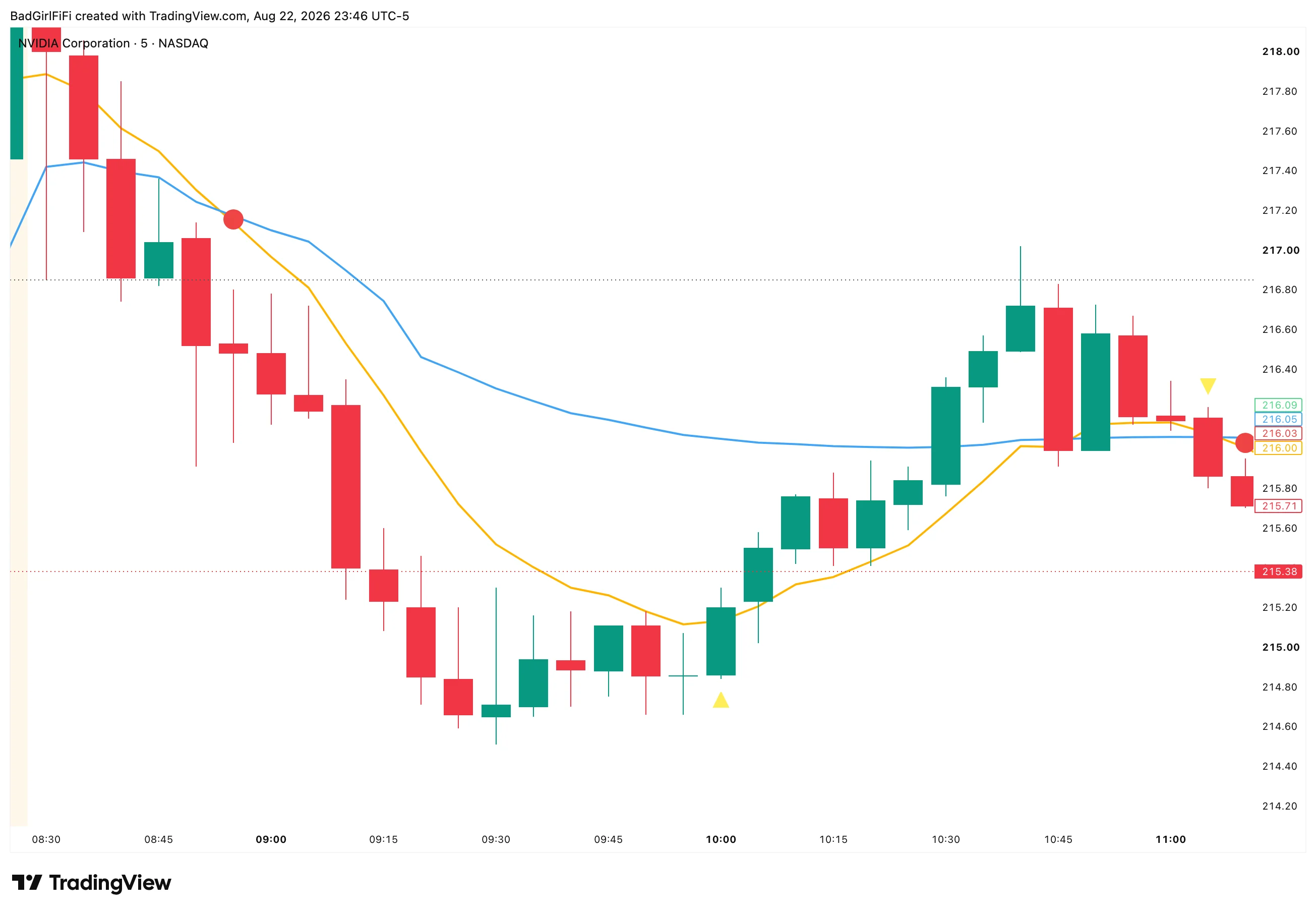 The 9 EMA in amber, VWAP in blue. A circle marks each cross; a triangle marks the exit.
What it draws
| Marker | Meaning |
|---|---|
| Amber line | 9 EMA |
| Blue line | VWAP, calculated on HLC3 |
| Green circle | Bullish cross — the 9 EMA crossed above VWAP |
| Red circle | Bearish cross — the 9 EMA crossed below VWAP |
| Triangle | Exit — the trade set up by the last cross has broken down |
Circles sit midway between the two lines at the moment they cross, so they mark the event without covering either line.
The cross
The 9 EMA above VWAP says short-term momentum has taken control from the session’s average price. Below, the opposite. The crossing is the moment that changes hands.
On its own a cross is a low-quality signal — in chop the two lines braid together and you’ll get crossings every few bars. What makes it tradable is context: a cross in the direction of the day’s trend, at a level that matters, after a real move.
The exit rule — and why it’s the useful part
After a cross the indicator holds that direction as an active trade. It then watches for one specific thing:
A candle whose body straddles the 9 EMA in the opposite direction. For a long: the bar opens above the 9 EMA and closes below it. For a short: opens below, closes above.
Two things about that definition matter.
It’s the body, not a wick. Price poking through the 9 EMA and recovering does nothing. The bar has to open one side and close the other — control has to actually change within the candle, not just probe.
It fires once. After an exit triangle prints, the indicator goes flat and stays quiet until the next cross sets up a new trade. One exit per cross, not a stream of triangles every time price wobbles across the average.
The result is an exit that usually arrives well before the opposite cross does. On the chart above, the short from the opening cross is closed by an upward triangle near the session low — the opposing bullish cross doesn’t arrive for another forty minutes.
Session filter
By default only crosses inside 09:30–16:00 ET are marked. Premarket and overnight crossings, where VWAP is built on thin volume and means very little, are ignored.
The window and timezone are both configurable, which matters for futures or a European session.
The filter gates crosses, not exits. An exit triangle can still print outside the window if a trade was active when the session ended. Arguably that’s what you want — a position doesn’t stop existing at 16:00.
What to pair it with
The 9 EMA and VWAP together are the backbone of most intraday scalping — the fast average against the session’s true average price. Whatever method you trade, if it references those two lines, this keeps them in front of you and marks the moment they change places.
The indicator’s job is deliberately narrow: hold the two reference lines, mark the crossings, and give you a mechanical exit so you aren’t eyeballing the 9 EMA under pressure.
Use the cross as context, not as the trade. A crossing tells you momentum changed hands. It doesn’t tell you the stock was worth trading, where your risk sits, or whether the day suits the setup. Your method supplies that — the indicator supplies the lines and the timing.
Alerts
Four named conditions, so setup is the standard TradingView flow.
| Alert | Fires on |
|---|---|
| Bullish 9EMA/VWAP Cross | 9 EMA crossing above VWAP, in session |
| Bearish 9EMA/VWAP Cross | 9 EMA crossing below VWAP, in session |
| Exit Long — Body Crossed Below 9 EMA | A bearish body straddling the 9 EMA while long |
| Exit Short — Body Crossed Above 9 EMA | A bullish body straddling the 9 EMA while short |
Right-click → Add alert → set Condition to 9EMA/VWAP X, then pick which of the four you want. Unlike some other TQE tools these are named conditions, chosen from the dropdown rather than through “Any alert() function call.”
Set the frequency to Once Per Bar Close. A cross that is true intrabar can un-cross before the candle finishes, and the exit rule is defined on the close. On bar close both behave exactly as documented.
Settings reference
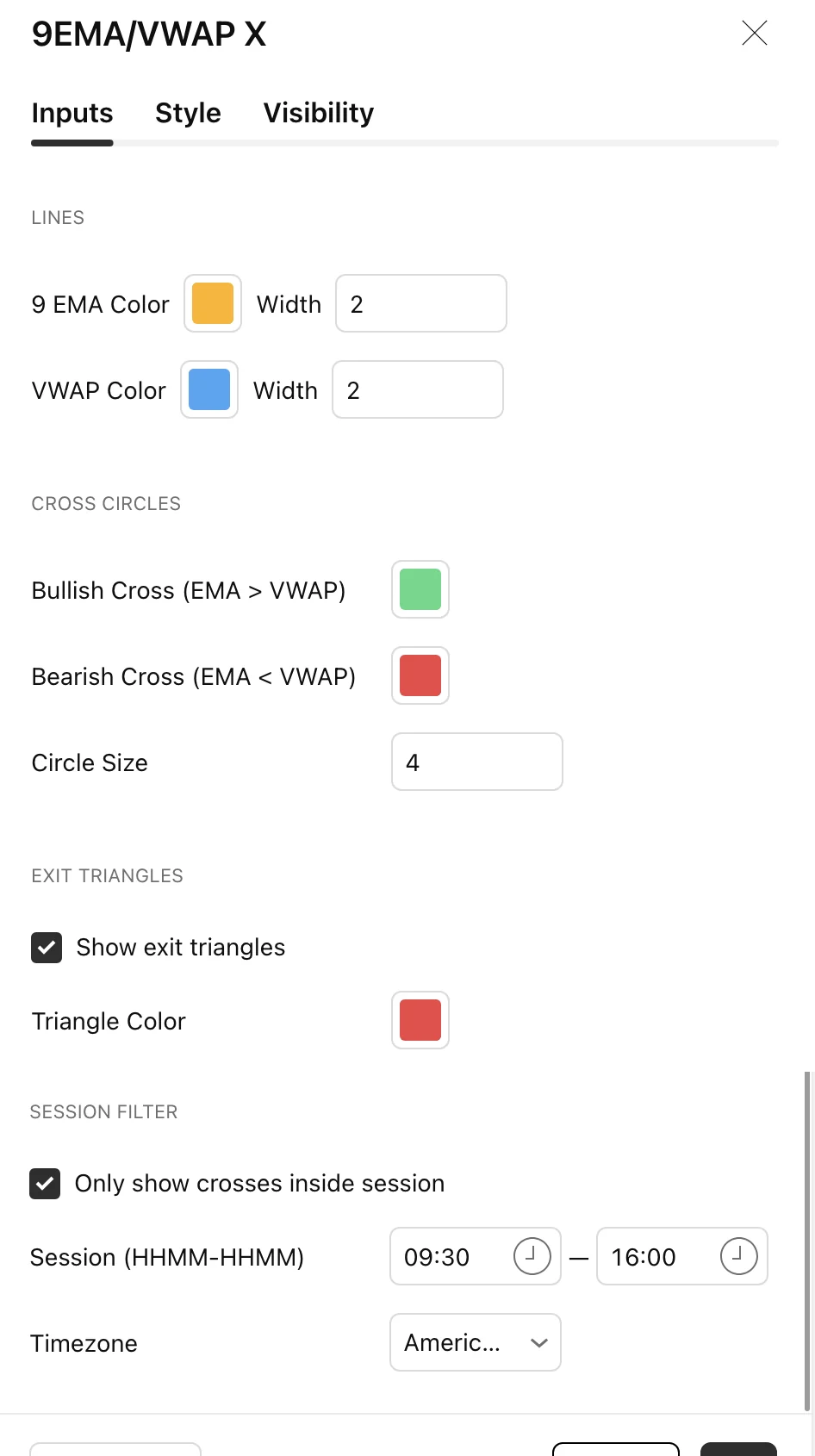
| Setting | Default | What it does |
|---|---|---|
| 9 EMA Color / Width | Amber, 2 | The fast average |
| VWAP Color / Width | Blue, 2 | Session VWAP |
| Bullish Cross | Green | Circle colour for crosses up |
| Bearish Cross | Red | Circle colour for crosses down |
| Circle Size | 4 | 1 to 10 |
| Show exit triangles | On | Master switch for exits |
| Triangle Color | Red | Exit marker colour |
| Only show crosses inside session | On | Session gate for crosses |
| Session (HHMM-HHMM) | 0930-1600 | Your trading window |
| Timezone | America/New_York | Six options plus exchange time |
Nothing in the logic is tunable — the period is fixed at 9 and the VWAP is the standard session calculation. Everything adjustable is appearance or timing.
FAQ
Which timeframe?
1 or 5 minute for scalping, with a higher timeframe open for context.
Price crossed the 9 EMA but no triangle appeared.
The candle’s body has to straddle it — open one side, close the other. A wick through doesn’t count, and neither does a bar that closes on the side it opened.
I got one triangle and then nothing.
Correct. One exit per cross. The indicator goes flat afterwards and waits for the next 9 EMA / VWAP crossing before tracking another trade.
Why are there no circles before the open?
The session filter. Premarket VWAP is built on thin volume and crossings there aren’t meaningful. Turn the filter off if you want them.
Does it repaint?
Crosses and exits are evaluated from bar values. Use Once Per Bar Close alerts and what you see historically is what you would have had live.
Is the VWAP anchored to the day?
Yes — standard session VWAP, reset each session, calculated on HLC3.
Ready for the full engine?
This one is free. The Trade Qualification Engine is the paid suite it was built alongside.